FAQs
Creating & Managing My Account
How do I create an account?
Simply click “Signup/Login” and enter your telephone number (mobile preferred) and click continue.
On the next page, fill out your first name, last name, and email address. If you have a Stong’s Points card, enter the telephone number associated with your points card in the Loyalty Phone Number field and then click Continue.
Login requires 2-factor authentication. You will be sent a 6 digit verfication code via text message. Enter the code to complete login and start shopping. For the best shopping experience, we recommend downloading our Stong’s app.
Can I create an account using my landline?
Yes, simply follow the steps in the “How do I create an account” section and when you get prompted for the verification code, choose “Resend code via SMS or Phone Call” and select the “Get code via phone call” option.
Please note, we recommend using a mobile number for your account as it allows us to send and receive text messages while we are picking your order.
For the best shopping experience, we recommend downloading our Stong’s app.
Where can I view my account details?
If you’re shopping from a desktop or mobile device:
You can find the account menu by clicking on “Hi, [Your Name]” in the top right corner next to the shopping cart, click on any of the options to go to your Profile page. If you’re on mobile web, the account menu is located just left of the shopping cart.
If you’re using our Stong’s app:
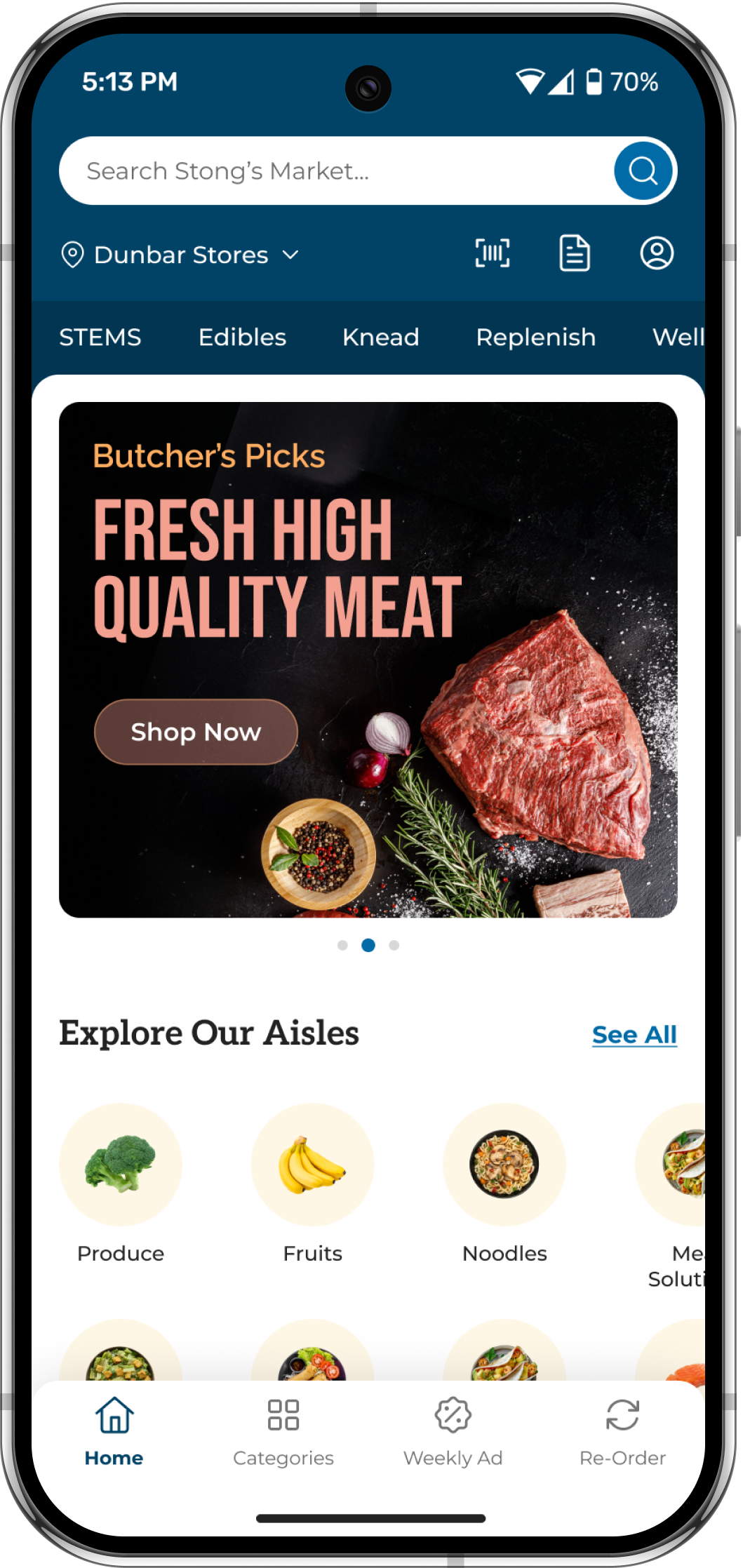
Simply click the round person icon at the very right of the search bar.
Can I update my personal information?
Yes, everything with the exception of your email address can be updated.
Can I register more than one delivery address?
No, at this point in time our system only saves the last delivery address that was entered. If you’re sending an order to a different address, simply update your address when selecting your fulfillment method, date, and timeslot.
How do I select the store I wish to order from?
Our system will try to pair you to your closest store.
If you wish to change your store, click on the store name at the top of the screen (top left on desktop, just below the search box in the Stong’s app and mobile web) and select the store you wish to order from.
Please note that each store has unqiue offerings and not all items are available at all stores.
Payments, Points, & Fees
What payment methods do you accept?
We accept all major credit cards (Visa, Mastercard, and American Express) and some Visa debit cards will work as well. Unfortunately, we do not accept payment by cash, debit, or cheques for our online shopping service.
Can I have more than one credit card saved?
Yes!
You can have multiple saved payment methods. Payment methods can be entered at checkout or by going to your Profile via the account ment and selecting “Payment Methods”
How does payment work?
When you place your order, instead of immediately charging your card, we place a temporary pre-authorization (hold) for an amount 25% higher than your order total at checkout.
We place this pre-authorization in case your total changes due to added items, replacement items, or weight adjustments. Should your order exceed the original pre-authorization due to additions and subsitutions, a new pre-authorization will be created.
After the order is complete, the hold will drop off, and your card will be charged for the final total as shown in the email receipt. While it usually happens same day, it may take up to 7 business days for the hold to drop off and the final total to appear on your statement.
What is the cost for delivery?
The cost for delivery varies between stores and areas.
For orders fulfilled by our Squamish and Surrey stores, the delivery fee is $14.
For orders fullfilled by our North Vancouver and Dunbar stores, the delivery fee is $10.99.
For orders to Bowen Island & Lion’s Bay, the delivery fee is $14.99.
For orders fulfilled by our STEMS by Stong’s floral shops, the delivery fee is $17.00
What is the cost for pickup?
There is no fee charged for pickup orders at any of our locations.
Can I use Stong's gift cards online?
Our gift cards can only be used for in-store purchases at this point in time.
Can I collect and use my Stong's points online?
You can earn Stong’s points from your online orders.
Stong’s points can only be redeemed on instore purchases at this point in time.
I have a discount code/promo code, how do I use it?
Discount codes may be entered on the checkout page. Look for “% Promo Code” and click add to enter the discount code in the box.
Discount codes are case sensitive and should be entered exactly as it appeared when it was provided.
Placing & Editing an Order
Is there a minimum order amount?
It depends on the fulfilment method!
For pickup orders, there is no mimimum and no fees.
For delivery orders, there is a $50 minimum before taxes & fees.
Can I add or remove items from my order after I have placed it?
Yes!
If we have not yet started to pick your order, simply go the account menu and select “My Orders”, find the order you wish to modify, and click on “Details” and then click “Add Items” to search for and add items.
To remove an item, simply click on the garbage can icon to the left of the quantity to remove the item.
You can make edits to the order yourself up to 4 hours before the start of your order fulfillment window unless we have already started the picking process.
If we have already started picking your order, you would have received a text message from our shopper, simply respond to that text message with any additions or changes!
Can I change my delivery/pickup window?
Yes!
If we have not yet start to pick your order, simply go to the account menu and select “My Orders”. Find the order you wish to modify, and then click on “Details” and select your new fulfillment date and time.
If we have started the picking process, please contact the store to request a change to the fulfillment window.
Can I change my delivery to pickup and vice versa?
Yes, please call the store at which you placed your order and we can make this adjustment.
How do I cancel my order?
To cancel an order, please call the store the order was placed at. For reference:
Stong’s North Vancouver – 604-630-3154
Stong’s Dunbar – 604-266-1401
Stong’s Squamish – 604-567-9444
Stong’s Surrey – 604-558-5653
STEMS North Vancouver – 604-973-0706
STEMS Surrey – 604-558-5661
I placed my order at the wrong store, how do I change it?
Please call the store at which you placed your order and ask for the order to be cancelled.
You will then have to select the store you wish to order from by clicking on the store name at the top of the screen. Once you have chosen the correct store, go to the account menu, select “My Orders”, find the cancelled order, and click “Add Items to Cart”.
Please note that each store has unqiue offerings and not all items are available at all stores.
Where do I indicate my preferences for substitutiuons?
This is done on the cart review page that is accessed by clicking on the shopping cart.
To apply preferences globally, simply check or uncheck “Substitute all with best match”. If you are premitting substitutions, we will do our best to find a comparable product. We will also contact you via text to review any substitutions and out of stocks.
If you prefer a more detailed approach, you can indicate your preference per item by clicking on the substitution indicator. On both desktop and in the application, this will open a popup where you can select either “Best Match”, “Do not substitute”, or you can select your preferred substitution by clicking “Substitute With” and then selecting specific items.
Substituted items are shown on the final invoice as a replacement for the original item.
How do I leave instructions for the shopper?
You can leave instructions for the shopper on each individual item.
This can be done by clicking on the product image to open the product details page and then adding any specific item instruction to the Instructions box.
Alternatively, this can be done on the cart review page by clicking 3 vertical dots next to the total price of the item and selecting “Add Instructions”.
Invoices, Credits, & Returns
Why am I not seeing out of stock items on my invoice?
You are only charged for items that are picked and packaged into your order.
Any items that are out of stock and are not subsituted are removed from the order and will not appear on your receipt.
What if I'm not satsified with a product or would like to return a product?
Your complete satisfaction is our number one goal.
If for any reason you are dissatisfied with a product, please call the store at which your order was fulfilled or click “Contact Support” at the bottom of your emailed invoice and we will be happy to assist you.
A product can be returned to the store at which it was purchased. Please bring a copy of your emailed invoice and notify the team member so we can find your order in the system and process a refund to your credit card.
General Questions
Who will deliver my order?
We use a mix of our Stong’s Express team and a third party to fullfil orders for delivery.
Our Surrey & Squamish stores use a third party exclusively, while our Dunbar & North Vancouver stores use third party for same day deliveries and our in house team for next day deliveries.
If your order is being dispatched via a third party, you will receive a text message with the couriers contact information and a link to track the progress of your order.
Where can I find items from the flyer?
All of the items on promotion can be found in the “Deals For You” section on the main page.
You can filter by specific Category to see what is on sale in each section of the store.
Is the pricing online the same as instore?
Yes, the pricing online generally mirrors the pricing in store – we do not apply any type of markups to our online pricing.
What is Stong's Market ASAP Pickup?
Our ASAP Pickup service let’s you order everything from groceries to a latte for pickup at your preferred store in as little as 30 minutes!
Need a few items for dinner? Order them before you leave the office and stop by the store on your way home to pick them up!
Looking for Lunch? Order ahead and have your Stong’s favourites ready and waiting for you!
What is the Stong's app?
The Stong’s Market app is our standalone shopping application and can be downloaded via the Apple app store, or the Google Play store.
While our service runs great on a desktop browser, and the website is mobile optimized, the best user experience is through the application.